|

|
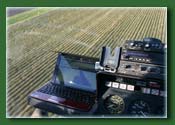
Uses standard Windows based
tablet, netbook or even laptop
- Standard Windows Software, easily
updatable through the internet
3D - perspective
view
- Moving map around a centered position
Simple user interface
- Standard windows navigation. Many
function keys are accessible through a keyboard integration
device. It integrates simple momentary switches typically
mounted at your cyclic stick or joystick.
Ability to use
existing log data as a background
- This allows you to see previous applied
maps, while you are working on the current application.
Marking points,
adding notes
- Export points as text file incl. latitude,
longitude and notes for use in other applications.
ESRI shape file
import and export options
- Provide your customers a shape file
export of the data. These files can then be imported to ArcGIS,
a popular GIS software package.
Google import
and export options
- View a "as applied" map over Google Earth satellite imagery
Export data to
common office applications
- Generate Application reports or Invoices directly from HeliGPS in standard office formats (MS Excel, OO Calc)
Tracks product,
operator, weather, equipment information within the same mapping
file
- A simple data entry screen completes your records
Add waypoints
(Helipads for example) manually or from csv files
- Create references with waypoints or navigate to your Helipads
Low total weight
- A typical netbook or tablet weighs
less than 3 lbs, add GPS receiver and some cabling and its
still less than 4 lbs
Guidance
- Simple contour requires no input from
the pilot, it simply provides a target line, left/right indication
on the screen and an arrow providing a visual indication of
the current flight path.
- AB-line with several options e.g.
path to path, racetrack etc.
Several equipment integration options
- 12 - 28 V sensing boxes or integration
to AutoCalII Flow-controllers create "as-applied" maps
- Accepts job files from FlightPlan
Online
|
|
|