The installation of a full HeliGPS
package is straight forward.
-
The software is installed with a Windows Installer package (msi)
and requires few clicks on "Next". Later software
updates are equally simple: Download a new installer package
and run it on your netbook. The very first install may require
the XNA library to be installed.
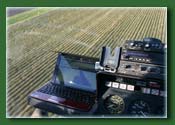
- The likely most demanding part of the installation is to
find or build a mount for your netbook. Western Helicopters
has build a simple to remove mount which slides in and out without
any extra tools required. The netbooks AC-power plugs into the
DC-AC inverter.
-
The EK-45 is wired for switches as well as boom lines and is then connected to the netbook via USB.
-
The GPS receiver is connected to the netbook via USB. In the case of a serial GPS output (Garmin 18X-5), a USB->RS232 converter cable may be required. The receiver itself must be in the left/right center of the aircraft and for better accuracy should have unobstructed view of the sky.
Please don't hesitate to e-mail info@heligps.com or call 780 990 4052
for any questions.